Is Google Ads Worth It
Is Google Ads worth it? Work it out before you spend
A forecast for your own keywords and four numbers you already know give a yes or no before the first click.

By Kaan Catalkaya, Founder of AdCtrl
· · 15 min read
Short answer
- Google Ads is worth it when a customer from it costs you less than the profit that customer brings, and you can check that before you spend.
- Take the cost per click from a Keyword Planner forecast for your keywords. The top-of-page bid range is what advertisers historically paid to show at the top over 30 days, not your forecast cost per click.
- Plan the conversion rate from your own enquiries, or from a labelled range: LocaliQ's 2026 customer data averages 8.18% leads per click, from 2.64% to 16.22% by industry.
- Google's Smart Bidding guidance says to judge performance over 2 conversion cycles or 2 weeks, whichever is longer.
- A lead is worth your profit per customer times your close rate. If the forecast cost per lead is above that, the answer is no for now.
Forecast clicks and cost for your keywords in Claude or ChatGPT
Start free3-day free trial · no card needed
Google Ads is worth it when a customer from it costs you less than the profit that customer brings. You can check that before you spend: take a Keyword Planner forecast of the cost per click for your own keywords, then run it through your conversion rate, close rate and any management fee1.
In our view it usually works for a business with a good profit per job that people search for when they need it, like a plumber, a dentist or a lawyer. It usually doesn't for low-ticket jobs, for services nobody types into Google, or when you can't tell which enquiries bought.
We build AdCtrl, which can fetch the forecast in Claude or ChatGPT, but every step here works in Google Ads itself.
Checked 14 November 2026 against Google Ads Help1 and LocaliQ's 2026 benchmark page2.
The worked example further down, in four numbers:
- $6.00 forecast cost per click (example numbers)
- $75 cost per lead at 8% conversion (example numbers)
- $300 cost per customer at 25% close (example numbers)
- $600 profit per customer, so worth it (example numbers)
Is Google Ads worth it for a small business?
Google Ads is worth it for a small business when the forecast cost per customer, fee included, comes in below the profit one customer leaves you, and you can see which enquiries turned into paying customers. Every part of that answer is a number you can find before the first click.
You need five of them. One comes from Google; the other four are already in your own records:
Use profit per customer, not the price of the job. In example numbers, a $1,000 job that costs you $400 in parts and labour leaves $600 to pay for the ad and for you.
One more condition is tracking. If you can't tell which enquiries bought, you can't answer the question after the test either. For phone-led businesses, the call tracking guide covers counting the calls.
What will a click cost for your keywords?
The best estimate of what a click will cost is the average cost per click (Avg. CPC) in a Keyword Planner forecast for your keywords at the bid you'd set. Google defines Avg. CPC in the forecast as "The average amount you might pay for a click"1.
Keyword Planner is Google's free keyword tool inside Google Ads. It shows how often people search for a phrase and estimates what a campaign on it would get.
To open it you need a Google Ads account with billing set up: Google says "You must complete your account setup by entering your billing information" before you can use basic features3.
Google's own Keyword Planner page says anyone with a Google Ads account can open it "after they create a campaign". In Google's access-level table, Read-only, Standard and Admin users can "use planning tools"; Email-only and Billing users can't. Anyone with one of those three access levels can run these steps:
List the searches you'd want to pay for.
Manual: write down the phrases a customer types when they need you now, such as "emergency plumber" or "water heater repair". In Keyword Planner, Discover new keywords suggests more.
With AdCtrl: write "Find keyword ideas for a plumbing business in Denver from these seeds: emergency plumber, water heater repair."
Open the forecast.
Manual: in Google Ads, go to Keyword planner within the Tools menu, select Get search volume and forecasts, paste your list and select Get started.
With AdCtrl: one request covers steps 2 to 4; the exact words are in the "Run the forecast with AdCtrl" section.
Set the bid and the dates.
Manual: enter a bid in the field at the top of the Forecast page, then select the date range at the top to set next month. Check that the plan targets the area you serve.
Read the numbers, then raise the bid once.
Manual: note clicks, cost and Avg. CPC, then enter a higher bid and note them again.
Keyword Planner shows two prices, and only one of them is a forecast of your cost per click:
Top-of-page bid range
Most advertisers bid somewhere in this range to show at the top of the page. In Google's terms, the low end is about the 20th percentile of what advertisers have historically paid for a top-of-page bid and the high end about the 80th, over the last 30 days1. It tells you how contested a keyword is.
Forecast Avg. CPC
What you might pay per click for your list at the bid you set, with your budget and the season taken into account. Use this number in your sum.
How far can you trust a Keyword Planner forecast?
A Keyword Planner forecast is Google's estimate from recent search data, and it is weakest for a new account in a small area.
That's where a lot of small businesses start. Google says that for a new advertiser, "your forecasts are based on historical average data for all advertisers", and results are less accurate for a small geographic location "simply because there is less data on which to base predictions"1.
Three more things Google says about how the forecast is built:
- Recent data: forecasts "are refreshed daily and based on the last 7–10 days, adjusted for seasonality"3, so a forecast run in an unusual week can read low or high.
- Your ads count: Google factors quality score and creative content into the forecast4, and Keyword Planner samples past ad performance, so a low clickthrough rate shows up as fewer forecast clicks. Forecast from the account you'd advertise from, not an unrelated one.
- Search only: the forecast covers the Search Network and leaves out clicks on the Display Network.

Screenshot, highlight added, accessed 14 Nov 2026: Google Ads Help, About Keyword Planner forecasts. A new account's forecast uses the average of all advertisers, because Google doesn't yet have enough data on your business.
Google gives no accuracy percentage. Our rule: run the forecast at two bids and plan with the higher Avg. CPC. If the answer is only yes at the cheaper one, treat it as a no.
What do clicks and leads cost in your trade?
Clicks and leads cost very different amounts by trade, and the forecast for your own keywords and area is still the number to plan with. For a rough picture before you open Keyword Planner, LocaliQ publishes 2026 averages from its own customers' campaigns2:
| Industry (LocaliQ's grouping) | Avg. cost per click | Conversion rate | Cost per lead |
|---|---|---|---|
| Home & Home Improvement | $8.33 | 8.05% | $90.92 |
| Attorneys & Legal Services | $9.87 | 5.55% | $131.63 |
| Dentists & Dental Services | $8.00 | 10.67% | $72.97 |
| Automotive repair, service and parts | $4.35 | 15.51% | $29.96 |
| Finance & Insurance | $3.39 | 2.64% | $74.44 |
| All industries | $5.42 | 8.18% | $66.69 |
A vendor's own-customer data, published 26 May 2026. Each column is LocaliQ's own average, so cost per click ÷ conversion rate won't reproduce its cost per lead. Conversion rate and cost per lead count leads, not customers.
Source: LocaliQ, Search Advertising Benchmarks for Every Industry [2026 Data]2
LocaliQ built these from "thousands of our customers’ advertising campaigns across Google Ads and Microsoft Ads", and the page doesn't state a sample size or period. Its conversion rate is "the number of leads you get divided by clicks", and across all its industries it runs from 2.64% (Finance & Insurance) to 16.22% (Animals & Pets)2.
Plan the conversion rate from your own enquiries if your site already gets visitors: the share who call or fill in a form. Without that, a lead is not a customer, so a published rate is only the first half of the chain. We'd plan with the lower half of your industry's figure until your own data says otherwise.
How much can you pay per lead and still make money?
You can pay up to your profit per customer times your close rate for each lead, and the forecast tells you whether you'll pay less than that. Close rate is the share of enquiries that become paying customers; take it from your own records, such as the last 20 quotes you sent and how many said yes.
Here is a worked yes, with example numbers for a plumbing business:
- Forecast: 300 clicks next month at an $8 max CPC bid, with a $6.00 Avg. CPC, so $1,800 of spend.
- Leads: an 8% conversion rate turns 300 clicks into 24 enquiries, $75 each.
- Customers: a 25% close rate turns 24 enquiries into 6 jobs.
- Cost per customer: $1,800 ÷ 6 = $300, against $600 profit per job. Worth it.

Example numbers: each customer costs $300, or $400 with a $600 fee, against $600 profit.
The example's 8% sits close to LocaliQ's home-improvement average of 8.05%2, so run a lower case too. At 5%, the same $1,800 brings 15 leads and 3.75 customers on average, $480 each: still under $600.
LocaliQ's home-improvement clicks average $8.332, so your own forecast may well come in above the example's $6.00. At $8.33 the same $1,800 buys about 216 clicks, 17 leads and 4.3 customers, about $416 each, still under $600.
Two formulas run the same check backwards. Break-even cost per lead = profit per customer × close rate, here $600 × 25% = $150. Max cost per click = break-even cost per lead × conversion rate, here $150 × 8% = $12. The CPA calculator does both with your own numbers.
If customers come back, profit per customer is bigger than one job. The LTV calculator works out what a customer is worth over all their orders.
When is Google Ads not worth it?
Google Ads is not worth it when the forecast cost per customer is higher than the profit a customer leaves you and no realistic change closes the gap. Take the same forecast, conversion rate and close rate for a low-ticket job that leaves $90 profit, in example numbers.
The cost per customer is still $300. A lead is now worth $22.50 ($90 × 25%), and the forecast puts a lead at $75. To break even on $1,800 you'd need 20 customers out of 24 enquiries, so no realistic keyword or ad change fixes this margin. A $90 job can still work on Google Ads if customers come back often enough, which is what the LTV calculator is for.
The other common no's:
- Nobody searches for it: the forecast shows a handful of clicks a month, too few to learn anything in a test.
- You can't tell which enquiries bought: the test can't give you an answer, so fix tracking first.
- The forecast is only a yes at the low bid: plan with the higher Avg. CPC, so a yes only at the cheaper bid counts as a no.
Run a test if
- The forecast cost per customer is below your profit per customer
- It stays below at the higher bid, fee included
- You can match enquiries to paying customers
Not yet if
- The forecast cost per lead is above profit × close rate
- You can't track calls or forms back to jobs
- The forecast shows too few clicks to judge
Try instead if
- You're a verified local service firm: Local Services Ads
- A tighter keyword list fits your margin better
- Your website gets no enquiries from the visitors it has
For local service providers, Google's own alternative charges per lead instead of per click. Google describes Local Services Ads as "pay-per-lead listings for verified local service providers"5. A tighter keyword list is the other route; the negative keywords guide shows how to keep out searches you'd never sell to.
How long and how big does a fair test need to be?
A fair test runs for at least two weeks, or two conversion cycles if that's longer, and is big enough to produce a few customers at your close rate. A conversion cycle is how long it usually takes from a click to the enquiry or sale.
Google's guidance for Smart Bidding is to "evaluate performance over 2 conversion cycles or a 2 week window (whichever is longer) accounting for conversion delay"6.
If you use Smart Bidding, the first week can look strange. Learning is the status Google shows after a big change to a campaign or bid strategy, and Google says "Learning status never lasts more than 7 days" while budget updates "never trigger" it6. Raising the budget mid-test doesn't send you back to the start, so judge the result over the whole window.
- 2 weeks the shortest window in Google's Smart Bidding guidance
- 2 cycles or two conversion cycles, if that's longer
- 7 days the longest Learning status lasts6
- $150 stop line per lead (example numbers)
Size the test from the forecast instead of a round number. In the example, 300 clicks give 24 enquiries and 6 customers. Six customers is a small sample, so read the result as a rough check of the sum. If your forecast promises one customer a month, the test can't tell you much, whatever it costs.
Write the stop line down before you start. In the example it is $150 per lead, the break-even cost per lead. If the full window comes in above it, stop or change something you can name. The ad budget calculator turns a sales goal into a budget and shows how a daily budget spends over a month.
Is it worth paying someone to run it?
Paying someone to run Google Ads is worth it when the sum still works with their fee added. Add the monthly fee to the ad spend before you divide by customers. In example numbers, a $600 fee turns $1,800 into $2,400, and $2,400 ÷ 6 = $400 per customer: still under the $600 profit.
Someone experienced can also work on what the forecast leaves out, such as your offer and the page people land on. Free reviews come from people who sell management, agencies like ours included, so they have a stake in the answer.
Once someone runs it, how to tell if your Google Ads agency is doing a good job covers what to check from your own login.
Run the forecast with AdCtrl
AdCtrl reads Keyword Planner data in Claude or ChatGPT: keyword ideas, search volume history and a forecast of clicks, cost and average cost per click for your keyword list at a maximum CPC bid you choose. It only reads, so nothing is created or spent in your account.
One request can ask for both reads on the same list, so you see how often people search next to what the clicks would cost. Write it with your own keywords, for the area you serve:
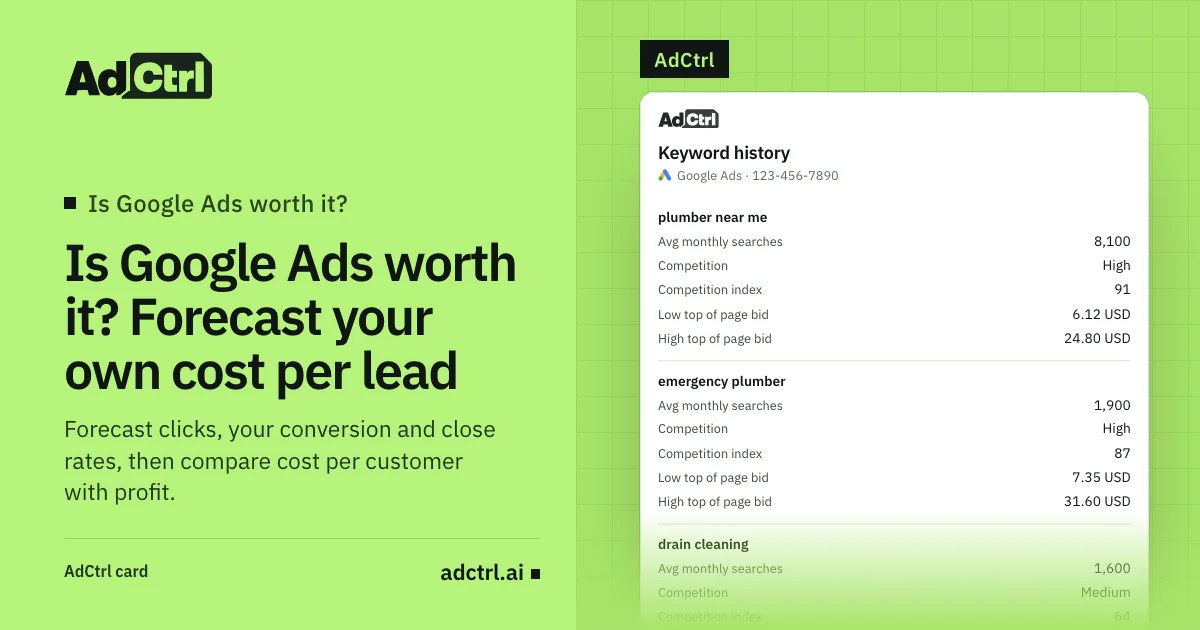
Show average monthly searches for these keywords in Denver, then forecast clicks, cost and average cost per click on Google Search for next month, English, phrase match, at an $8 and an $11 max CPC: emergency plumber, plumber near me, water heater repair, drain cleaning, leak detection.
AdCtrl's real keyword history card, filled with example data: average monthly searches, paid-ad competition and the top-of-page bid range for each of the five plumbing keywords. The forecast in the same request returns totals for the whole list, not one row per keyword. In chat, the answer comes as text.
Then run the result through your own conversion rate, close rate and profit per customer. Know the limits before you rely on it:
- No conversion estimate: the forecast returns clicks, cost and Avg. CPC; leads and customers come from your own rates.
- No budget input: it takes a max CPC bid, so divide your monthly budget by the forecast Avg. CPC to see how many clicks you can afford.
- Search only: Google Search, at a manual bid.
- Google's estimate: it is Google's own Keyword Planner forecast, so it is weaker for a new account and a small area in the same way.
Google's own Keyword Planner goes further here. Its forecast lets you change the average daily budget, and you can forecast conversions instead of clicks once conversion tracking is on3.
The worth-it check
The worth-it check is nine yes-or-no questions to answer before you put money into a test:
- People search for your phrases: the forecast shows clicks for your area.
- You ran the forecast at two bids and planned with the higher Avg. CPC.
- Your conversion rate comes from your own site, or from the low half of a labelled range.
- Your close rate comes from your own records of enquiries and jobs.
- You know your profit per customer after materials and labour.
- Any management fee is added before you divide by customers.
- The forecast cost per customer is below your profit per customer.
- You can tell which enquiries became paying customers.
- The test window and the stop line are written down.
Frequently asked questions
How much budget is enough to test Google Ads?
Enough for the forecast to promise a handful of leads at your conversion rate. At 8%, one lead takes about 13 clicks (1 ÷ 8% = 12.5), so in example numbers 10 leads need about 125 clicks, or $750 at a $6.00 Avg. CPC. Those 10 leads are 2 or 3 customers at a 25% close rate, and $5 a day buys far less.
Is Google Ads worth it if I only break even on the first job?
It can be, if customers come back. A customer who books again later brings profit on that job without a new click from you. Work out what a customer is worth over all their orders with the LTV calculator and use that as profit per customer.
Should I try Local Services Ads instead?
If you're a local service provider that can get verified, compare both. Google describes standard Google Ads as "pay-per-click text ads open to any business" and Local Services Ads as pay-per-lead listings that show a Google Verified badge5. Run the same sum with the price per lead you'd pay.
Is Google Ads still worth it in 2026?
The answer depends on your numbers this month, not the year. Keyword Planner forecasts are built from the last 7–10 days of data3, so a forecast you run today already reflects current click prices in your area.
What to do next
Run a forecast for your own keywords at two bids, put the higher Avg. CPC through your conversion rate and close rate, and compare cost per customer with profit per customer. If it's a yes at the higher bid, run a test with a stop line; if it's a no, change the margin or the keywords before you change the ads.
For the formulas with your own numbers, use the CPA calculator. To pull the forecast for your keywords in Claude or ChatGPT, see how to connect AdCtrl and start the free trial.
Sources
- About Keyword Planner forecasts, Google Ads Help. Accessed 14 November 2026.
- Search Advertising Benchmarks for Every Industry [2026 Data], LocaliQ (with WordStream by LocaliQ): a vendor dataset from its own customers' campaigns, 26 May 2026. Accessed 14 November 2026.
- Use Keyword Planner, Google Ads Help. Accessed 14 November 2026.
- Generate forecast metrics, Google Ads API (Google for Developers), 13 November 2026. Accessed 14 November 2026.
- Local Services Ads, Google. Accessed 14 November 2026.
- About Smart Bidding learning, Google Ads Help. Accessed 14 November 2026.
- Research Keywords for Campaigns with Keyword Planner, Google Ads. Accessed 14 November 2026.
- About access levels in your Google Ads account, Google Ads Help. Accessed 14 November 2026.